Secure AI Development on Tanzu Platform with MCP Gateway
Use the Tanzu MCP gateway as a developer landing zone for Cursor, Claude Code, Goose, and Codex, with platform-auth pass-through for web search and per-user GitHub OAuth.
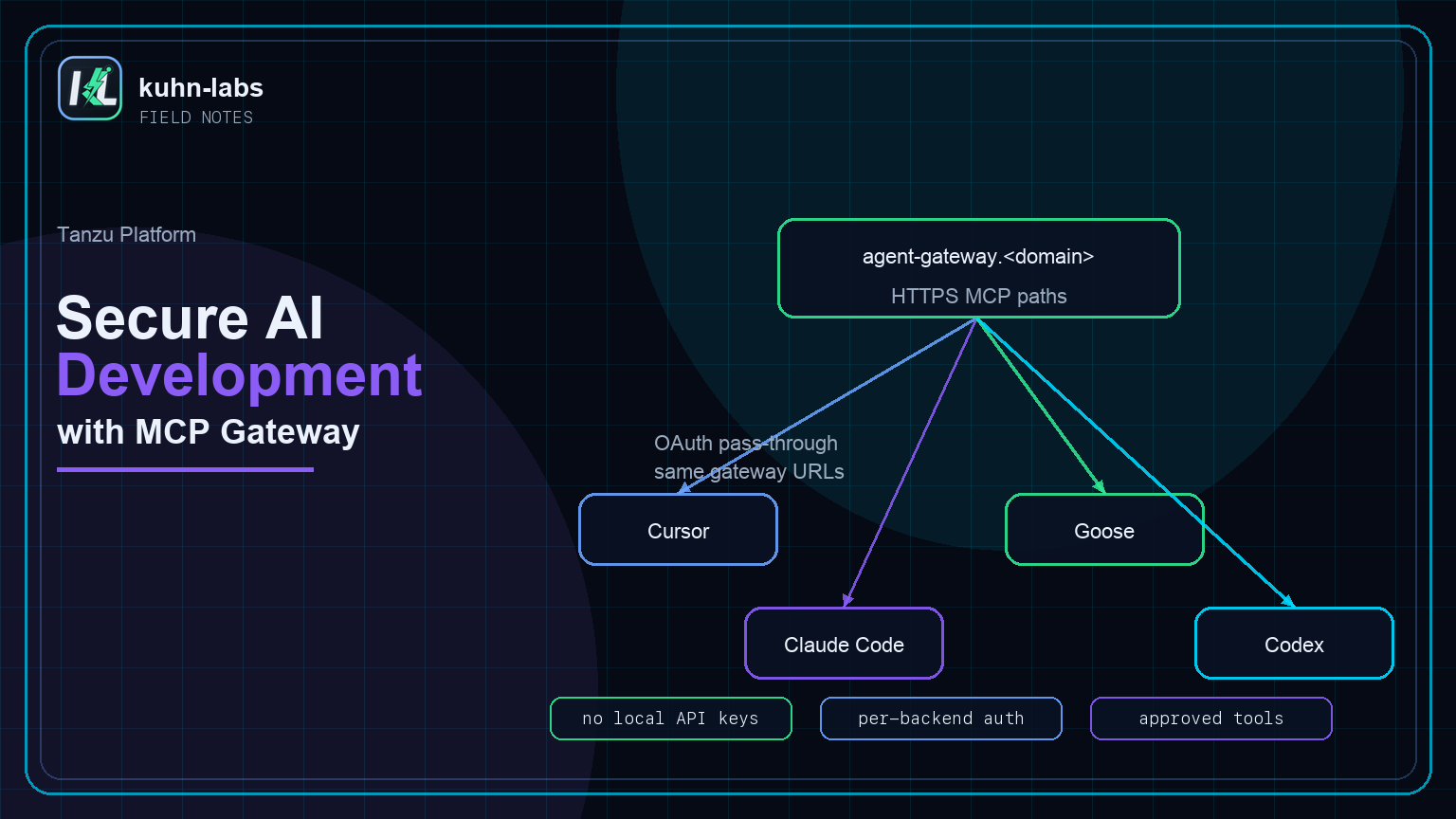
Developers are going to bring AI into the tools where they already work: Cursor, Claude Code, Goose, Codex, terminal workflows, IDEs, and whatever comes next. The question for a platform team is not whether those clients exist. The question is how to give them useful tools without asking every developer to run their own MCP servers, paste API keys into every app, or invent a different setup on every laptop.
In Part 2 I federated two MCP servers behind one gateway and bound it to an on-platform agent. This post is the reason that gateway matters beyond the agent: it becomes a governed landing zone for developer tools. The platform publishes approved MCP backends once, and developers consume them from the harness of their choice.
This is Part 3, the finale of the Tanzu Platform 10.4 AI agent series. Part 1 built the agent; Part 2 built the gateway.
By the end of this post, the gateway serves two audiences: the on-platform agent from Part 2, and local developer tools like Cursor, Claude Code, Goose, and Codex. The tools stay on Tanzu Platform. The clients only need MCP URLs, plus whatever sign-in a protected backend requires.
Part 2 used the MCP gateway to extend a Tanzu-hosted agent with tools. This post uses that same gateway to extend developer workstations and IDE harnesses. That symmetry is the point: publish a tool backend once, then let platform-hosted agents and developer-hosted clients consume it through the same governed gateway paths.
Why this pattern helps developers
The hard part is not getting one client to call one tool once. The hard part is making tools available consistently across teams while keeping secrets, auth policy, and backend ownership on the platform side.
The gateway gives the platform team a clean middle ground. Developers keep their preferred client, but the tool surface is published and governed from Tanzu Platform. A team can expose web search, GitHub, internal docs, ticketing, platform APIs, or service catalog actions once, then let multiple MCP-speaking clients consume those tools through the same routes.
From the developer side, the benefit is practical: fewer local processes, fewer secrets on laptops, less setup drift between teammates, and the same approved tools available from Cursor, Claude Code, Goose, Codex, or the on-platform agent. From the platform side, you get one place to update tools, rotate credentials, add auth, observe traffic, and decide which backends are safe to expose.
Gateway portal as the landing zone
Recall from Part 2 that the gateway publishes one path per backend. That makes the gateway's browser page the landing zone for developers: open the portal, find the backend you need, copy the URL or use the client shortcut, then paste that configuration into your IDE or agent tool of choice.
The public route follows the same shape for every backend:
https://agent-gateway.<your-cf-domain>/web-search-spring/mcp
https://agent-gateway.<your-cf-domain>/github-mcp/mcp
Each client gets one MCP server entry per backend, all sharing that hostname. The gateway also gives you a portal view that makes the routing model obvious: each backend has its own endpoint path and client connection shortcuts.
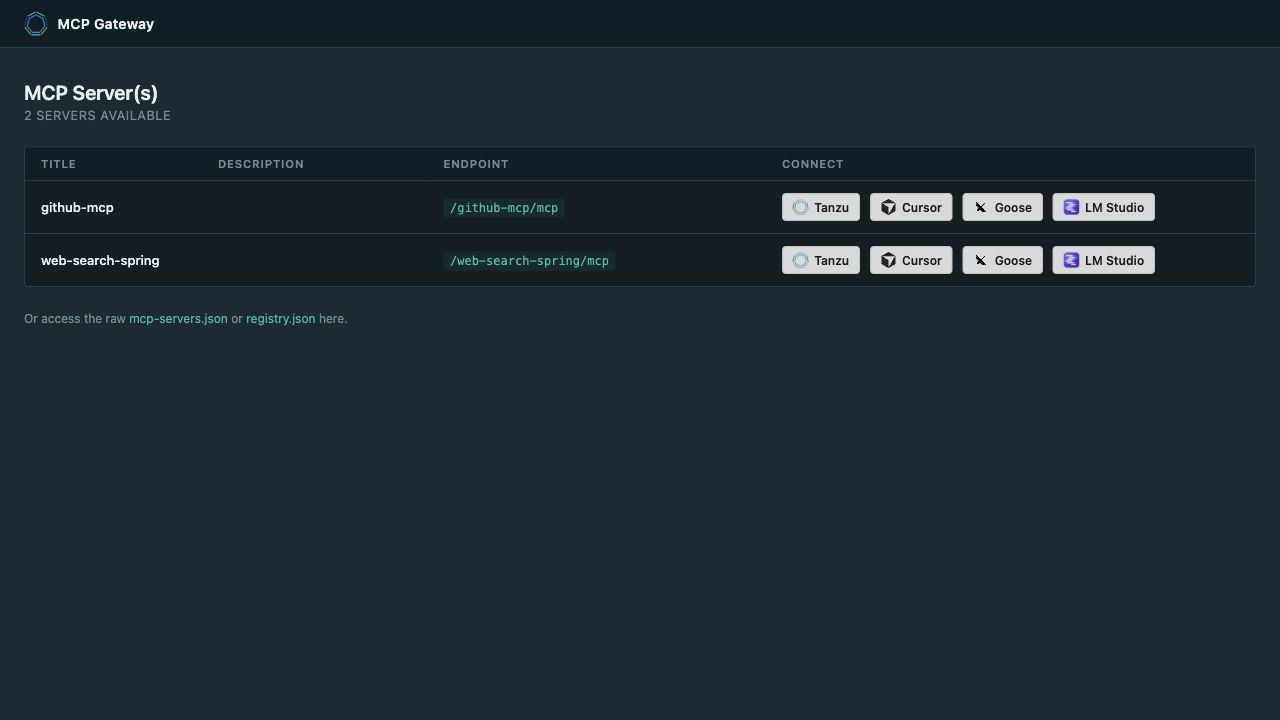
Treat the MCP gateway portal like an internal service catalog for AI tools. It answers the questions a developer actually has: which tools are available, what endpoint do I use, which client shortcuts exist, and which backends need sign-in. The platform team owns the backend apps and auth policy; the developer owns choosing where to consume them.
Connect your dev tools and harnesses
The pattern is always the same: create one client entry per backend path. Do not point clients at the gateway root; point them at /web-search-spring/mcp or /github-mcp/mcp. That keeps the tool boundary explicit and makes each backend's auth model independent.
This is the developer experience you want: copy a URL, accept a portal shortcut, or paste a small config block. The developer does not need to know where the backend app runs, which app owns the Brave key, how the GitHub server was packaged, or which foundation route maps to which internal app. They only need the MCP endpoint and whatever sign-in the backend requires.
Read the four examples below as the same flow repeated in different harnesses:
web-search-spring or github-mcp from the gateway page.
/mcp URL into the client.
Cursor
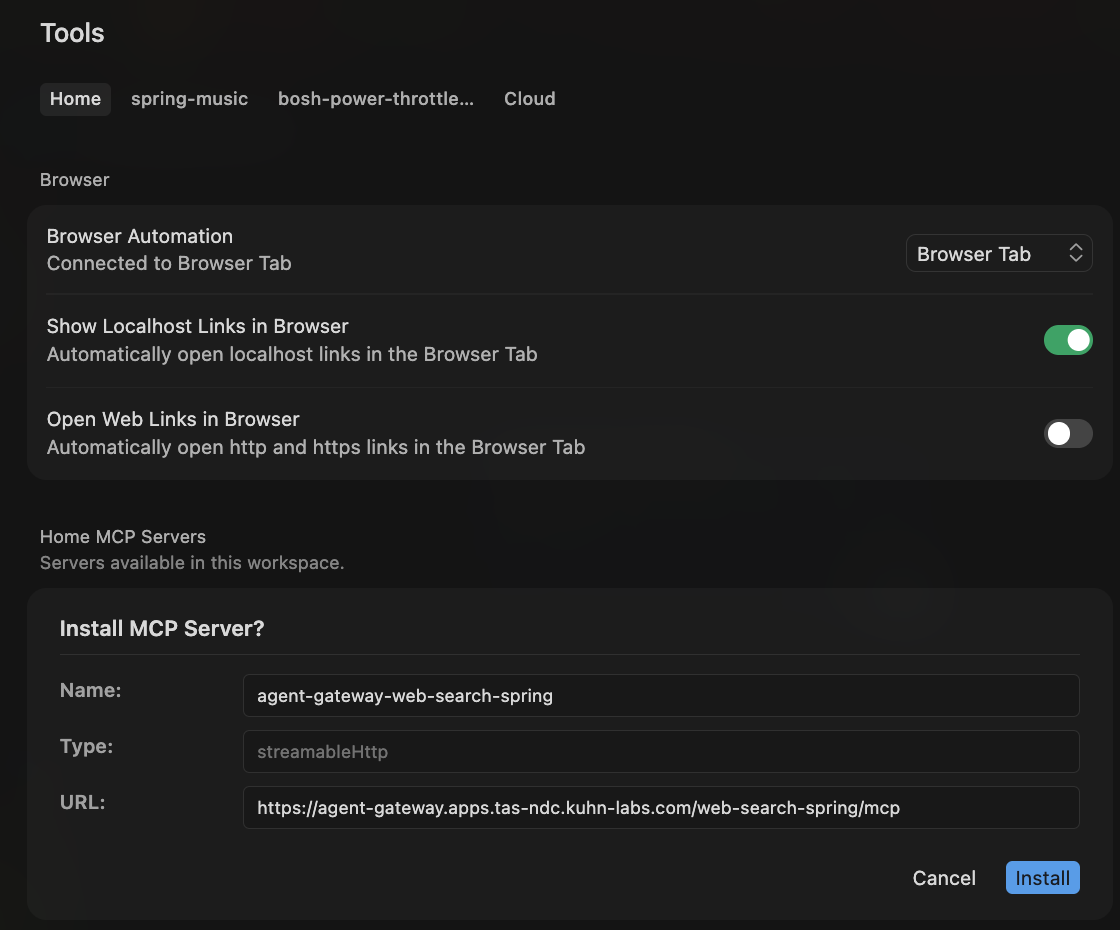
Click the Cursor button in the gateway portal. The browser opens a Cursor deeplink that carries the backend name and MCP server payload. For web-search-spring, the decoded payload looks like this:
{
  "name": "agent-gateway-web-search-spring",
  "config": {
    "url": "https://agent-gateway.apps.tas-ndc.kuhn-labs.com/web-search-spring/mcp",
    "type": "streamable-http"
  }
}
If you prefer to manage config directly, merge the same server definitions into ~/.cursor/mcp.json:
{
  "mcpServers": {
    "tanzu-web-search-spring": {
      "type": "streamable-http",
      "url": "https://agent-gateway.<your-cf-domain>/web-search-spring/mcp"
    },
    "tanzu-github-mcp": {
      "type": "streamable-http",
      "url": "https://agent-gateway.<your-cf-domain>/github-mcp/mcp"
    }
  }
}
Claude Code
Add each backend as an HTTP MCP server. Claude Code stores the same gateway paths locally, then surfaces any required sign-in flow when a protected tool is invoked. The common developer shape is a terminal REPL: a read-eval-print loop, which is just an interactive prompt where you type an instruction, the harness evaluates it with the model and tools, and the result prints back into the same session.
claude mcp add --transport http tanzu-web-search-spring \
  https://agent-gateway.<your-cf-domain>/web-search-spring/mcp

claude mcp add --transport http tanzu-github-mcp \
  https://agent-gateway.<your-cf-domain>/github-mcp/mcp
Once the servers are registered, the REPL flow is intentionally small:
$ claude
> Use web_search to find the latest Cloud Foundry routing docs.

tool: tanzu-web-search-spring.web_search
answer: The official Cloud Foundry routing docs are at docs.cloudfoundry.org...
Goose
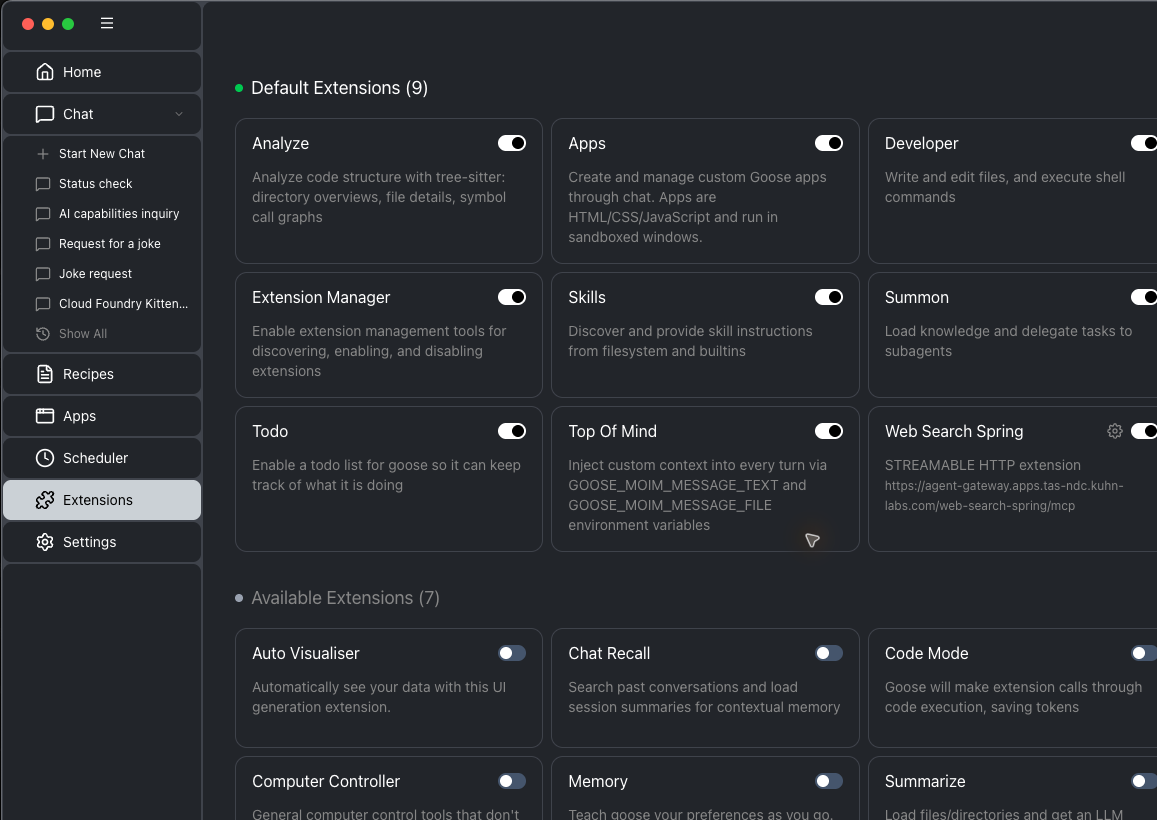
Click the Goose button in the portal, or use goose configure → Add Extension → Remote Extension once per backend. The portal deeplink carries the same pieces Goose asks for in the UI:
{
  "url": "https://agent-gateway.apps.tas-ndc.kuhn-labs.com/web-search-spring/mcp",
  "transport": "streamable_http",
  "id": "agent-gateway-web-search-spring",
  "name": "web-search-spring"
}
Codex
Add the gateway paths to ~/.codex/config.toml, then restart Codex so the MCP server list is reloaded:
[mcp_servers.tanzu_web_search_spring]
url = "https://agent-gateway.<your-cf-domain>/web-search-spring/mcp"

[mcp_servers.tanzu_github_mcp]
url = "https://agent-gateway.<your-cf-domain>/github-mcp/mcp"
The portal may expose additional client shortcuts, such as LM Studio, depending on the gateway version. The important part is the same: every client gets the backend-specific /mcp URL.
What happens when a tool needs auth?
From the developer's point of view, the flow should feel routine. They add the MCP URL to Cursor, Claude Code, Goose, Codex, or another MCP client. They ask the model to do something that needs a tool. If the backend is open, the tool call runs. If the backend requires identity, the client surfaces a sign-in flow or a sign-in URL, and the developer authenticates with the identity system that owns that backend.
The important part is where the credential lands. The developer is not pasting a Brave API key, a GitHub token, or a platform service credential into every IDE. The gateway brokers the auth flow and passes the right token to the right backend. The IDE tool keeps acting like an MCP client; the platform decides how that backend should be authenticated.
That means auth can vary by backend without changing the developer pattern. Web search can use platform identity through OIDC. GitHub can use GitHub OAuth as the signed-in developer. A future internal docs MCP server could use a different enterprise identity provider. The developer still starts from the same portal and the same kind of MCP URL.
For platform engineers, a raw curl smoke test is still useful when you are proving that a gateway path initializes, lists tools, and accepts tool calls. I would keep that in your runbook. For the developer-facing story, the more important test is whether their chosen client can add the MCP endpoint, discover tools, and complete the right sign-in when the tool requires identity.
Use platform auth for Brave-backed web search
The web-search backend is the Spring server from Part 2. It wraps Brave Search, but developers should not need a Brave API key on their laptops. The platform-owned MCP app holds that backend integration. Developers authenticate to the platform, and the gateway passes platform identity through to the web-search MCP server.
Open mode is fine for a demo, but in production you'll want the web-search server to require identity. Before this step, anyone who can reach the route can call the open web-search MCP. After this step, the developer's tool still points at the same MCP URL, but the first protected call may trigger a platform sign-in. Once authenticated, the gateway forwards a token the Spring backend can validate.
OIDC is the right shape when the backend should trust your platform identity provider. The Spring server validates JWTs from Tanzu SSO, while the gateway handles the client-facing auth flow. That means the backend does not need to know about Cursor, Goose, or Codex individually. It only needs to know: "did this request arrive with a valid platform token from the issuer I trust?"
The setup has three moving pieces:
- The backend MCP app keeps the Brave Search API integration server-side, requires a JWT again, and validates that JWT against Tanzu SSO.
- The gateway binding declares that this backend route uses
OIDCand names the identity provider service instance. - The developer's client keeps using the same MCP URL; when auth is required, the tool prompts for platform sign-in instead of asking the developer to manage the Brave credential locally.
Flip the Spring server back into secured mode, bind a Tanzu SSO instance for token validation, and tell the gateway to broker OIDC for that route:
# a Tanzu SSO (p-identity) instance provides the JWKs the server validates against
cf create-service p-identity uaa websearch-sso
cf bind-service web-search-spring websearch-sso

# re-secure the Spring server (JWT required on /mcp again)
cf set-env web-search-spring WEBSEARCH_SECURITY_ENABLED true
cf restage web-search-spring

# tell the gateway to broker OIDC for this backend's route
cf bind-service web-search-spring agent-gateway -c '{
  "auth": { "service-instance": { "type": "OIDC", "name": "websearch-sso" } }
}' --wait
The gateway now runs this route in OIDC-proxy mode. A tokenless call does not reach the useful tool response. A signed-in call carries a platform token the backend can validate. It's the same brokering pattern as GitHub below, just a different identity provider: web-search uses OIDC (Tanzu SSO), GitHub uses GITHUB_ENTERPRISE. One gateway, two real auth models, each declared right in the bind-service.
For developers, the important part is that security does not turn into bespoke local setup. They still point their client at the same MCP path. The difference is that the first protected web-search call may require a platform sign-in, and the platform can make an access decision before the backend spends a Brave Search request.
Pass through GitHub OAuth per user
The GitHub backend is different. github-mcp-server in HTTP mode is OAuth-only — every call must carry a GitHub token, so platform identity is not enough by itself. That is a good thing: GitHub should run as the developer using the tool, not as a shared platform token, because repo access, audit trails, and permissions all depend on GitHub user identity.
Instead of hiding that behind a bot account, the gateway brokers a per-user GitHub sign-in. Setup is one-time for the platform team, then each user authenticates in their browser on first use from their chosen tool. After that, tool calls run with the user's GitHub permissions, so private repo access, organization policy, and audit trails still behave like GitHub.
The moving pieces are similar to OIDC, but the trust boundary is different:
- The GitHub MCP backend expects a GitHub token on every useful request.
- The gateway owns the OAuth redirect and token handoff, so local clients do not store a shared GitHub token.
- The developer's tool surfaces the sign-in flow when GitHub auth is required.
- The developer signs in as themselves, and GitHub decides what that user can see or do.
Register a GitHub OAuth App (GitHub → Settings → Developer settings → OAuth Apps). The Homepage URL is the gateway's dashboard URL; the Authorization callback URL is the redirect URI your gateway dashboard shows. Put the resulting client ID and secret into an identity-provider service instance, then rebind the GitHub backend to the gateway referencing it:
# identity-provider service instance holding the GitHub OAuth App credentials
cf create-user-provided-service github-oauth-idp \
  -p '{"client_id":"<app-client-id>","client_secret":"<app-client-secret>"}'

# rebind the backend with GitHub OAuth passthrough
cf bind-service github-mcp agent-gateway -c '{
  "auth": { "service-instance": { "type": "GITHUB_ENTERPRISE", "name": "github-oauth-idp" } }
}' --wait
Now point a client at tanzu-github-mcp and ask something that hits GitHub:
List my open pull requests.
The first call triggers OAuth. Depending on the client, the tool may open a browser or show a URL for the developer to follow. After consent, the tool runs as the signed-in GitHub user, not a shared bot account. That per-user identity is the whole point: the gateway brokers a different auth model per backend — OIDC for web-search, GITHUB_ENTERPRISE for GitHub — each declared in its own bind-service, and the backends never see each other's credentials.
One honest note: these sign-ins are interactive and per-user by design. You can automate the gateway and backend bindings, but you should not try to automate away the developer consent step. A human signs in once through their tool/browser, then the tool can keep using the gateway path according to the client's token/session behavior.
What you built
One MCP gateway. The on-platform agent from Part 2 reaches each backend through it, and Cursor, Claude Code, Goose, and Codex reach the same backends through the same gateway. Per-backend routing, one governed tool surface, and each backend's credentials handled the way that backend needs. That's the developer-tooling story in Tanzu Platform 10.4: publish tools once, secure them centrally, and let developers consume them from the client where they already work.
- The gateway is a normal route — Cursor, Claude Code, Goose, and Codex use the same per-backend URLs (
/<backend>/mcp). - The Spring web-search backend keeps the Brave API key on the platform side; developers use platform auth through
"type": "OIDC"when the route is secured. - GitHub uses the same gateway brokering pattern with a different provider: register a GitHub OAuth App, bind with
"type": "GITHUB_ENTERPRISE", and users sign in as themselves from their chosen tool. - One gateway, one governed tool surface, consumed on- and off-platform.